A copilot is not a product. It’s a pattern: a natural-language interface to an organisation’s own knowledge. What makes one useful is how specific it is to the people using it and the data they work with.
Everyone wants a copilot today, and enterprise users expect a lot from one. They don’t just want search. They want precise answers, trends, business insight, help building a roadmap, and they want all of it to work across messy systems that keep changing.
The copilot in this post didn’t start out meeting those expectations. It started as one small RAG app. Over time it grew into a set of specialised “brains” coordinated by an orchestrator. This is the story of that journey, and of the lessons we picked up at each step.
The setting: one copilot, many personas
The copilot sat on top of two internal systems:
- An issue tracker, recording bugs, incidents and requests raised by clients and end users
- A feedback platform, capturing feature requests, user feedback and market research
Together they held the raw material for understanding what users needed. On top of that data, several groups worked together: a client raises an issue, sales adds the revenue impact, engineering assesses complexity, a release manager builds it into the roadmap, and a director tracks it in the quarterly business review.
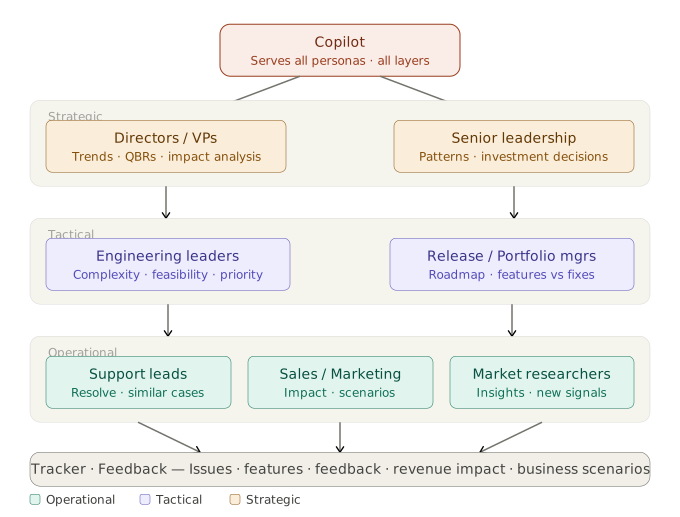
Each of these personas wanted something different from the copilot:
- Support leads: resolve issues faster using similar past cases
- Sales and marketing: assess revenue impact and business scenarios
- Engineering leaders: estimate complexity and feasibility
- Release and portfolio managers: balance features against fixes
- Directors, VPs and senior leadership: trends, QBR material, investment decisions
One copilot had to serve all of them. That requirement shaped everything that followed.
Brain 1: Navigator, a documentation RAG
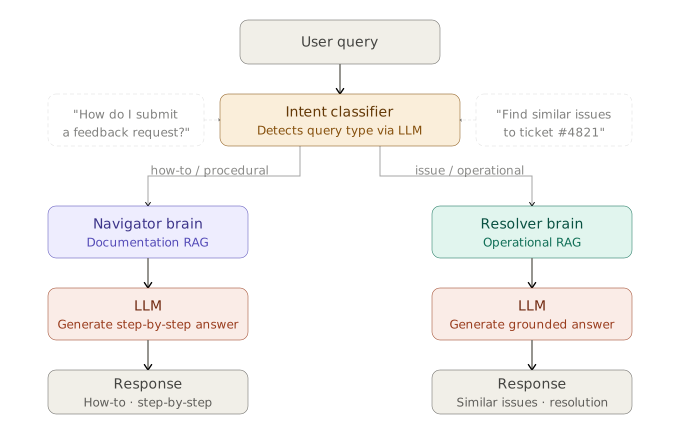
We started small. Clients and new support leads needed help with “how to” questions about the tools themselves: How do I submit feedback? How do I link an issue to a new feature?
The first brain, Navigator, was a classic RAG over the tools’ user guides.
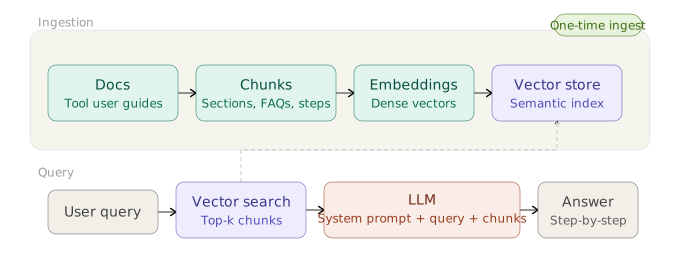
| Stage | Choice |
|---|---|
| Ingestion | One-time manual ingest of static docs; re-ingest on release |
| Chunking | Logical, section-wise segments: procedures, FAQs, steps |
| Embeddings | OpenAI text-embedding-ada-002 |
| Vector store | Azure AI Search, top-k retrieval |
| Generation | GPT-4 (later upgraded to GPT-4.1) with LangChain, prompted for clear step-by-step instructions |
It was lightweight and reliable for procedural questions, and it cut training overhead for new users. For static documentation, simple works.
Brain 2: Resolver, an operational RAG
Next, support leads wanted to resolve client issues faster, and business leads wanted summaries of issues and feature requests. That meant putting a natural-language interface on the operational data, not the documentation.
The second brain, Resolver, retrieves similar issues and business scenarios and summarises them to guide resolution.
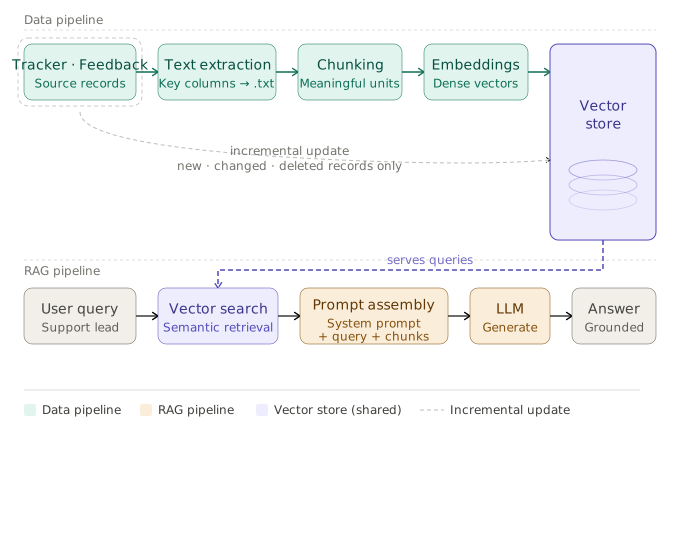
This data was dynamic, so the design was different:
- Incremental ingestion. An Azure Data Factory pipeline ran twice a day and processed only new, changed and deleted records. Reprocessing everything on each run would never scale.
- Parent/child chunking. Small chunks for retrieval precision, with the larger parent record sent to the LLM for context.
- Better embeddings.
text-embedding-3-large, for higher fidelity on complex issue text. - Hybrid retrieval. BM25 keyword search plus vector search in Azure AI Search, followed by reranking.
- Few-shot prompting. GPT-4 (later GPT-4.1) with examples to keep the tone and format of summaries consistent.
We now had two RAG systems, one procedural and one operational.
Useful, but not enough
Both brains helped. Both also had clear gaps.
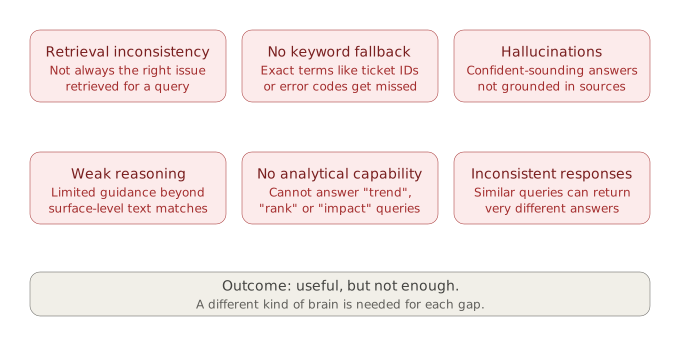
Some of these were retrieval problems. Vector search alone misses exact terms like ticket IDs and error codes. Some were generation problems: confident answers that weren’t grounded, and different answers to similar questions.
The biggest gap was more basic. Questions like these were out of reach:
- “What are the top 5 features that could generate the most revenue?”
- “Show me the trend of issues over the last 6 months.”
RAG retrieves text. It can’t rank, aggregate or reason over structured data. These questions needed a different kind of brain altogether.
Before adding one, we needed a way to send each question to the right brain. The first answer was an intent classifier: an LLM call that labels the query as procedural or operational and routes it accordingly.
Brain 3: Strategist, NL-to-SQL for analytics
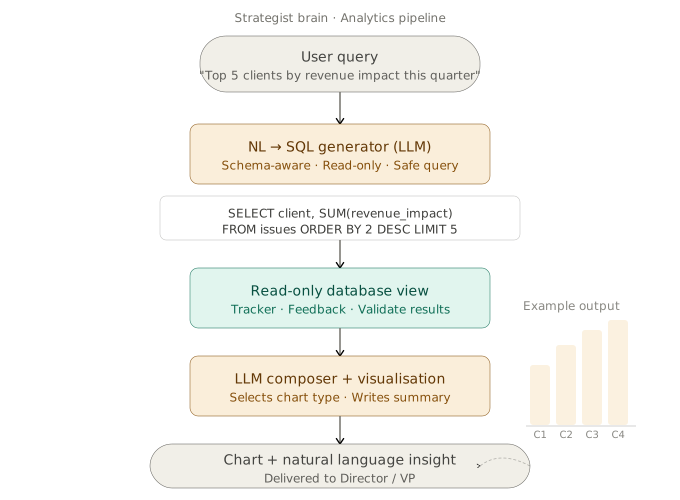
Directors and VPs wanted trends, revenue impact and QBR insights. The third brain, Strategist, turns a business question into SQL, runs it, and returns a chart with a short narrative.
| Stage | Choice |
|---|---|
| SQL generation | GPT-4 (later GPT-4.1), with the system prompt carrying the full database schema |
| SQL execution | A custom SQL tool against read-only views in SQL Server |
| Visualisation | GPT-4 (later GPT-5) generating Python for interactive Plotly charts |
| Summary | GPT-4 (later GPT-4.1) writing a short, context-aware narrative |
| Orchestration | LangChain with the custom SQL tool |
Two design choices mattered most:
- Read-only, always. The SQL tool only ever sees read-only views. Generated SQL can be wrong, but it can never change data.
- Chart and narrative together. A chart alone needs interpreting; a summary alone hides the shape of the data. Leaders got both.
This brain changed how the copilot was used. It went from a retrieval assistant to an analytics partner, and preparing QBRs and executive reports took noticeably less manual work.
Can we trust the answers?
With three brains in place, the next question wasn’t about features but trust:
- Is an answer grounded in the right source, or confidently wrong?
- If two similar questions get different answers, how would we even notice?
- Does the generated SQL actually reflect what was asked?
- Before a director acts on an insight, what makes it trustworthy?
We built an evaluation framework that combined two kinds of signal:
- Quantitative: retrieval precision and recall, relevance, groundedness and overall response quality
- Qualitative: human and LLM-as-judge review, and user feedback
Scores tell you what is wrong. People tell you why. You need both.
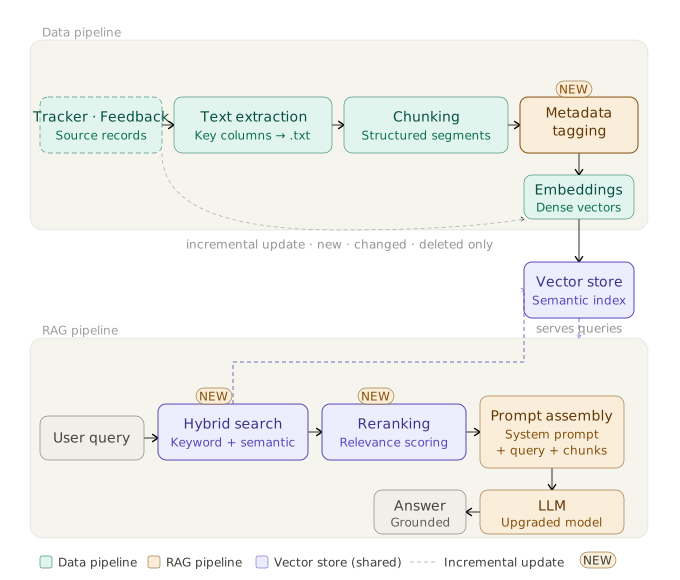
The evaluation results drove concrete changes across the RAG pipeline:
- Metadata tagging on every chunk: client, severity, date and source system
- Structured chunking of issues into consistent segments
- Hybrid search wherever pure vector search was still in use
- Reranking before the LLM sees any chunk
- Upgraded models and meta-prompt tuning for better reasoning and more consistent answers
What the first three brains taught us
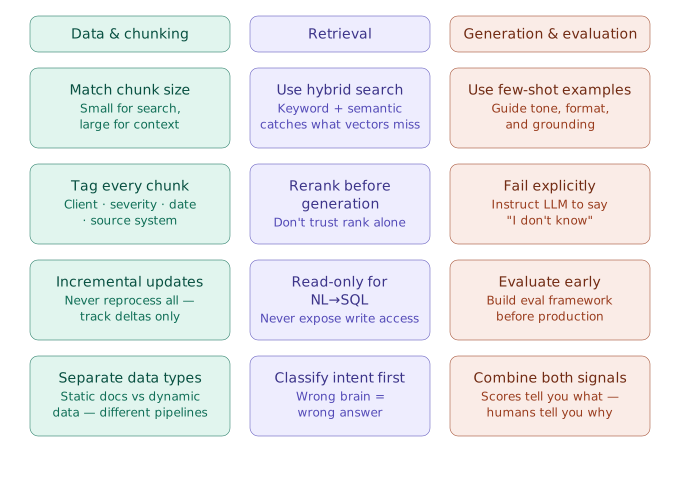
Data and chunking
- Match chunk size to the job: small for search, large for context.
- Tag every chunk with metadata you’ll want to filter on.
- Use incremental updates. Never reprocess everything; track deltas.
- Keep static and dynamic data in separate pipelines.
Retrieval
- Use hybrid search. Keywords catch what vectors miss.
- Rerank before generation. Don’t trust the first-pass ranking.
- Give NL-to-SQL read-only access. Never expose write access.
- Classify intent first. The wrong brain gives the wrong answer.
Generation and evaluation
- Use few-shot examples to guide tone, format and grounding.
- Fail explicitly. Instruct the model to say “I don’t know”.
- Build the evaluation framework before production, not after.
When one brain isn’t enough
Then came questions like this one:
Get me the trend of issues from Client X over the last 6 months, and summarise them.
The trend needs Strategist. The summaries need Resolver. An intent classifier can only pick one, so neither brain could answer the question on its own. Classifier routing was brittle, and it kept the brains in silos.
The brains needed to collaborate, not compete. That meant orchestration.
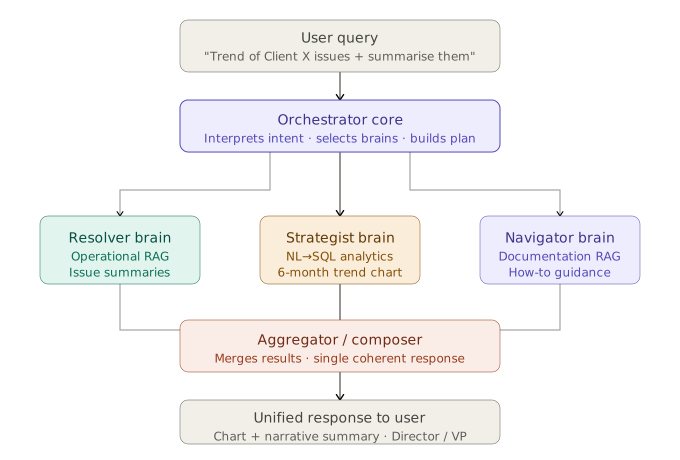
The orchestrator interprets the intent, decomposes the query, picks the brains it needs, runs them, and merges the results into one coherent answer. For the question above, the user gets a six-month trend chart with a narrative summary of the main issue themes, as a single response.
This was the real shift in the design: from a set of LLM applications to a multi-agent, persona-driven copilot.
Inside the orchestrator
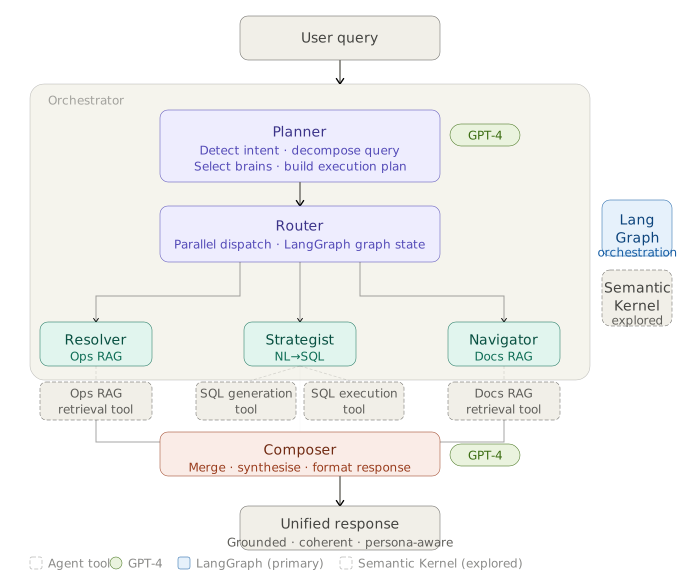
- Planner (GPT-4, later upgraded to GPT-5): detects intent, decomposes the query, selects brains and builds an execution plan.
- Router: dispatches to brains in parallel, with state managed in a LangGraph graph.
- Brains as tools: each brain exposes its capabilities as tools: Resolver’s retrieval, Strategist’s SQL generation and execution, Navigator’s documentation retrieval.
- Composer (GPT-4, later GPT-5): merges and synthesises the outputs into a single, persona-aware response.
We also explored Semantic Kernel, but LangGraph became the primary orchestration framework.
Orchestration: what to get right
- Plan before routing. Understand the full intent first, then decide which brains to call.
- Run brains in parallel. Don’t wait on them one after another.
- Design for partial failure. One brain failing shouldn’t break the whole response.
- Keep brains independent. Each owns its logic and can be tested and deployed separately.
- Trace everything. Log which brains were called, why, and what they returned.
- Make it extensible. New brains should plug in without rewiring the flow.
- Compose thoughtfully. Users see one answer, so the seams must be invisible.
- Evaluate end to end. Good brains are necessary but not sufficient.
And a few things to plan for from the start, even if you build them later: agentic memory across turns, human-in-the-loop approval for high-stakes decisions, self-critique of the plan before dispatching it, and prompt caching to cut cost and latency.
What’s next
With orchestration and evaluation in place, adding a brain becomes a modular change.
- A prioritisation brain for engineering leaders and release managers, scoring work on complexity, revenue impact and urgency to propose a now/next/later roadmap.
- An action agent, currently in progress.
- More personas over time, such as compliance or innovation, each served by new brains plugged into the same orchestrator.
The platform work continues too: API gateways and regional failover for resilience against rate limits, labelled human feedback as ground truth, cost monitoring per agent and per persona, evaluation extended across the whole orchestration, and prompt caching for efficiency.
The takeaway
A useful enterprise copilot is not one model or one RAG pipeline. It’s a set of specialised brains, each built for a particular kind of question and a particular kind of data, coordinated by an orchestrator and kept honest by evaluation.
It’s also never finished. New personas arrive, new questions get asked, and the system has to grow to meet them. That’s what I mean by a living system.
If you’re building something similar, I’d love to compare notes. Find me on LinkedIn.